
深度解析流量治理——从重试风暴到自适应限流算法
在现代分布式系统架构中,故障 不再是偶发的异常,而是具有 统计必然性的常态。任何规模化的微服务系统在长期运行中,都不可避免地会面临网络分区、节点资源耗尽或数据库连接饱和等问题 [1]。因此,系统架构设计必须建立在「故障必然发生」这一基本假设之上。
虽然基础的 重试机制 能通过指数退避策略解决暂时的网络抖动,但在高并发场景下,单纯依赖重试往往独木难支,甚至可能引发灾难性的后果。为了构建具备高韧性的系统,我们需要引入更高级的中间件模式来解决供需失衡与级联故障问题:
消息队列(Message Queue)—— 流量的持久化容器与缓冲
当上游请求量远超下游处理能力,且数据决不允许丢弃时,同步调用会导致系统崩溃或数据丢失。消息队列在此扮演了「蓄水池」的关键角色。- 异步解耦与持久化:将请求写入具备持久化能力的队列中,确保即使下游暂时不可用,数据依然安全存储不丢失。
- 削峰填谷:系统利用队列的堆积能力容纳突发流量,将上游的瞬时高压转化为下游可以接受的平稳流速,实现存储空间换处理时间、延迟时间换服务质量的策略。
限流器(Rate Limiter)—— 流量整形与下游保护
为了防止重试风暴(Retry Storm)或积压数据的瞬间释放击穿下游,限流器不再作为拒绝策略执行者,而是作为 流量整形器(Traffic Shaper) 存在。- 平滑速率:采用令牌桶(Token Bucket)或漏桶(Leaky Bucket)算法,严格控制消息投递给下游的速率。无论队列中积压了多少数据,都强行将流速限制在下游系统的安全水位之下。
- 背压机制(Backpressure):当达到限流阈值时,严禁直接丢弃请求。策略转变为暂缓从队列拉取消息。这种机制将压力反向传导至消息队列进行积压,确保下游服务始终在最佳负载下运行,同时保证了所有业务请求最终都能被处理。
综上所述,消息队列负责 全量接纳并保存 突发流量,而限流器负责 匀速释放 流量。两者结合,在确保数据不丢失的前提下,有效解决了上下游处理能力不对等的问题。
重试风暴
重试机制在提升系统可靠性的同时,也引入了一个严重的系统级风险:重试风暴(Retry Storm)。当系统面临大规模故障或性能瓶颈时,或者多个服务实例同时对同一个下游依赖发起重试,会产生严重的请求放大效应,导致下游系统负载快速增长,最终可能引发级联故障。
为了量化分析重试风暴的影响,我们建立一个数学模型进行严谨推导。
模型变量定义与假设
定义变量如下:
- 上游系统初始请求负载为 。
- 上游系统最大重试次数为 。
- 下游系统的处理能力为 。
- 下游系统的错误率为 。
- 下游系统收到的总负载为 。
考虑下游过载时的具体情况,此时有 。
同时,为了简化分析引入假设如下:
- 下游系统的处理能力是固定的,不会因为系统负载增加而动态调整。
- 超出下游处理能力的请求将失败,并且失败导致的开销与成功请求的开销相同。
模型与现实的残酷偏差
在实际的高并发工程场景中,情况往往比模型假设更加严峻:
处理能力的动态衰减 ( 非恒定)
模型假设下游处理能力是固定的。然而在现实中,当系统过载时,由于 CPU 上下文切换频繁、数据库连接池争抢、锁竞争以及 GC 停顿等因素,系统的实际吞吐量不仅无法维持,反而会急剧下降。这种现象被称为吞吐量坍塌。超时失败的资源黑洞
模型包含了失败导致的开销与成功请求的开销相同的假设。但在重试风暴中,绝大多数失败是由 超时 引起的。这意味着一个失败的请求占用了服务端最长的时间窗口和线程资源才被释放。
因此,实际的系统负载并非线性增长,而是极有可能呈现 指数级恶化。简单的重试机制在此时不再是救命稻草,而是压死骆驼的最后一根稻草。
模型分析
网络中传输总负载包含了初始负载 以及所有重试请求的负载,可计算为
又由错误率 的定义,有
为了简化分析,我们定义 流量溢出率 ,,表示初始流量中超出下游处理能力的比例,即
将 代入上述方程组联立求解,可以得到极简形式的系统错误率 与总负载 公式为
模型结论
根据以上分析,可以得到两个重要结论。
系统错误率与流量溢出率的关系
该公式表明,系统的实际错误率 等于流量溢出率 的 次方根。这意味着即使初始溢出率 很小,随着重试次数 的增加,系统的错误率 也会迅速增加,最终趋于一个饱和值 。单纯增加重试次数 是无法解决重试风暴问题的。一味增加重试次数,只会使得重试风暴愈加严重。
系统总负载与流量溢出率的关系
该公式表明,系统的实际总负载 等于下游处理能力 的 倍。由放缩不等式 和 可知,系统总负载的放大倍数至少与重试次数 呈线性增长关系。这意味着,在流量溢出的情况下,简单地增加重试次数 并不能解决问题,反而会使下游系统承受的压力以 的速度剧烈膨胀,从而加速系统崩溃。
推导说明
推导过程:
利用不等式 ,令 ,则有
移项得
取倒数可得上述下界公式
上述推导基于下游处理能力恒定的理想情况。在实际工程中,在重试风暴中,很多错误是由 超时 引起的。超时意味着请求占用了服务端最长的处理时间窗口才失败。这意味着失败请求对资源的消耗可能远大于成功请求。过载往往会导致处理能力进一步下降,使得实际崩溃速度比数学模型预测的还要快。
重试风暴模拟器
为了更直观地理解重试风暴的放大效应,下面的交互式模拟器允许您调整各种参数,观察负载放大的程度:
<template>
  <div class="retry-storm-dynamic">
    <h3>重试风暴模拟器 (动态演练版)</h3>

    <!-- 上半部分:配置与理论分析 -->
    <div class="top-section">
      <div class="panel controls-panel">
        <div class="panel-header">
          <h4>🛠️ 动态参数控制台</h4>
          <span class="live-badge" v-if="simState.isRunning">🔴 LIVE</span>
        </div>

        <!-- 1. 初始负载控制 -->
        <div class="control-group">
          <label>初始请求负载 (R₀): {{ config.initialLoad }} req/s</label>
          <input type="range" v-model.number="config.initialLoad" min="100" max="5000" step="50" class="slider-input" />
          <div class="quick-actions">
            <button class="btn-tiny" @click="config.initialLoad = 500">平稳</button>
            <button class="btn-tiny" @click="config.initialLoad = 2000">高负载</button>
            <button class="btn-tiny danger" @click="config.initialLoad = 5000">⚡ 突发脉冲</button>
          </div>
        </div>

        <!-- 2. 下游承载力控制 -->
        <div class="control-group">
          <label>下游系统承载力 (Capacity): {{ config.downstreamCapacity }} req/s</label>
          <input type="range" v-model.number="config.downstreamCapacity" min="0" :max="5000" step="50"
            class="slider-limit" />
          <div class="quick-actions">
            <button class="btn-tiny danger" @click="config.downstreamCapacity = 0">💥 宕机 (0)</button>
            <button class="btn-tiny" @click="config.downstreamCapacity = config.initialLoad * 0.8">过载 (80%)</button>
            <button class="btn-tiny success" @click="config.downstreamCapacity = 4000">扩容恢复</button>
          </div>
        </div>

        <!-- 3. 重试策略控制 -->
        <div class="control-group">
          <label>最大重试次数 (n): {{ config.retryCount }} 次</label>
          <input type="range" v-model.number="config.retryCount" min="0" max="10" step="1" />
        </div>

        <div class="control-group">
          <label>初始重试间隔 (t₀): {{ config.initialRetryInterval }} ms</label>
          <input type="range" v-model.number="config.initialRetryInterval" min="100" max="3000" step="100" />
        </div>
      </div>

      <!-- 理论推演面板 (根据当前滑块动态变) -->
      <div class="panel theory-panel" :class="theoryStatusClass">
        <h4>📊 当前参数理论推演</h4>
        <div class="metrics-grid">
          <div class="metric">
            <span class="label">基础供需缺口:</span>
            <span class="value">{{ theory.gapText }}</span>
          </div>
          <div class="metric">
            <span class="label">流量放大倍数:</span>
            <span class="value">{{ theory.amplification.toFixed(2) }}x</span>
          </div>
          <div class="metric big-metric">
            <span class="label">理论最终总负载:</span>
            <span class="value">{{ Math.round(theory.totalLoad).toLocaleString() }} req/s</span>
          </div>
          <div class="metric">
            <span class="label">系统结局预判:</span>
            <span class="value">{{ theory.statusText }}</span>
          </div>
        </div>
        <div class="theory-note">
          <small>* 操作提示:先点击“开始实验”,然后点击“宕机”按钮模拟故障,观察红色曲线(总负载)如何因为重试而爆炸式增长。</small>
        </div>
      </div>
    </div>

    <!-- 下半部分:实时模拟 -->
    <div class="simulation-section">
      <div class="sim-header">
        <h4>⚡ 实时动态模拟实验</h4>
        <div class="sim-controls">
          <button v-if="!simState.hasStarted" @click="startSimulation" class="btn-start">▶ 开始实验</button>
          <div v-else>
            <button @click="resetSimulation" class="btn-reset">⏹ 停止并重置</button>
          </div>
        </div>
      </div>

      <div class="sim-dashboard" v-if="simState.hasStarted">
        <!-- 实时指标卡 -->
        <div class="sim-metrics">
          <div class="sim-metric-card">
            <div class="label">实时总负载 (Total Load)</div>
            <div class="value" :class="{ 'danger': simState.currentTotalLoad > config.downstreamCapacity }">
              {{ Math.round(simState.currentTotalLoad).toLocaleString() }}
            </div>
            <div class="sub">含重试: {{ Math.round(simState.currentRetryLoad).toLocaleString() }}</div>
          </div>
          <div class="sim-metric-card">
            <div class="label">实时丢包/失败数</div>
            <div class="value danger">{{ Math.round(simState.currentDropped).toLocaleString() }}</div>
            <div class="sub">req/s</div>
          </div>
          <div class="sim-metric-card">
            <div class="label">待重试队列 (Future Load)</div>
            <div class="value warning">{{ Math.round(simState.pendingRetriesCount).toLocaleString() }}</div>
            <div class="sub">Pending Tasks</div>
          </div>
        </div>

        <!-- 动态图表 -->
        <div class="charts-container">

          <!-- 图表 1: QPS 负载 -->
          <div class="chart-box">
            <div class="chart-title">
              <span>流量负载趋势 (Total vs Capacity)</span>
              <span class="legend">
                <span class="dot red"></span> 总负载
                <span class="dot green"></span> 成功处理
                <span class="line-dash"></span> 容量限制
              </span>
            </div>
            <!-- SVG ViewBox -->
            <svg width="100%" height="220" viewBox="0 0 850 220" preserveAspectRatio="none">
              <defs>
                <linearGradient id="fillGradientRed" x1="0" x2="0" y1="0" y2="1">
                  <stop offset="0%" stop-color="#ff4d4f" stop-opacity="0.2" />
                  <stop offset="100%" stop-color="#ff4d4f" stop-opacity="0" />
                </linearGradient>
              </defs>

              <!-- Y轴背景网格与刻度数值 -->
              <g class="grid-lines">
                <g v-for="(tick, index) in qpsAxisTicks" :key="index">
                  <line :x1="50" :y1="tick.y" :x2="850" :y2="tick.y" stroke="#eee" stroke-width="1" />
                  <text x="45" :y="tick.y + 4" text-anchor="end" font-size="11" fill="#999">{{ tick.label }}</text>
                </g>
              </g>

              <!-- 动态容量线 (随配置变化) -->
              <line :x1="50" :y1="getQpsY(config.downstreamCapacity)" :x2="850" :y2="getQpsY(config.downstreamCapacity)"
                stroke="#666" stroke-width="2" stroke-dasharray="5,5" />
              <text x="845" :y="getQpsY(config.downstreamCapacity) - 5" text-anchor="end" fill="#666" font-size="11"
                font-weight="bold">Capacity</text>

              <!-- 成功曲线 (绿色) -->
              <polyline :points="getPoints(history.success, chartMaxY, 200, 50, 850)" fill="none" stroke="#52c41a"
                stroke-width="2" />

              <!-- 总负载曲线 (红色) -->
              <polyline :points="getPoints(history.total, chartMaxY, 200, 50, 850)" fill="url(#fillGradientRed)"
                stroke="#ff4d4f" stroke-width="2" />
            </svg>
          </div>

          <!-- 图表 2: 错误率 -->
          <div class="chart-box small-chart">
            <div class="chart-title">实时失败率 (Failure Rate %)</div>
            <svg width="100%" height="120" viewBox="0 0 850 120" preserveAspectRatio="none">
              <g class="grid-lines">
                <line x1="50" y1="10" x2="850" y2="10" stroke="#f0f0f0" stroke-width="1" />
                <text x="45" y="14" text-anchor="end" font-size="10" fill="#999">100%</text>
                <line x1="50" y1="60" x2="850" y2="60" stroke="#f0f0f0" stroke-width="1" />
                <line x1="50" y1="110" x2="850" y2="110" stroke="#ddd" stroke-width="1" />
              </g>

              <polyline :points="getPoints(history.errorRate, 100, 100, 50, 850, 10)" fill="none" stroke="#faad14"
                stroke-width="2" />
            </svg>
          </div>
        </div>
      </div>

      <div class="empty-state" v-else>
        <p>👋 <b>操作指南:</b></p>
        <p>1. 点击“开始实验”。<br>2. 点击“宕机”按钮将容量降为0,观察总负载如何因为重试而飙升。<br>3. 点击“扩容恢复”,观察系统如何慢慢消化积压的重试流量。</p>
      </div>
    </div>
  </div>
</template>

<script>
export default {
  name: 'RetryStormDynamic',
  data() {
    return {
      config: {
        initialLoad: 1000,
        downstreamCapacity: 1200, // 初始给足容量,让系统处于健康状态
        retryCount: 3,
        initialRetryInterval: 800,
        backoffMultiplier: 1.5
      },
      simState: {
        hasStarted: false,
        isRunning: false,
        timer: null,
        tick: 0,
        currentTotalLoad: 0,
        currentRetryLoad: 0,
        currentDropped: 0,
        pendingRetriesCount: 0,
      },
      retryScheduler: [],
      history: {
        total: [],
        success: [],
        errorRate: [],
        maxLength: 150
      }
    }
  },
  computed: {
    // 理论推演 (实时响应滑块变化)
    theory() {
      const R0 = this.config.initialLoad;
      const C = this.config.downstreamCapacity;
      const n = this.config.retryCount;

      let baseFailureRate = 0;
      let gapText = '无缺口';

      if (R0 > C) {
        baseFailureRate = Math.pow(1 - (C / R0), 1 / (n + 1));
        gapText = `-${(R0 - C).toFixed(0)} req/s`;
      }

      // 等比数列求和计算最大可能放大倍数
      // 假设系统完全崩溃 (Failure Rate = 100%)
      const maxAmplification = n + 1;

      // 基于当前供需的预估总负载
      // 如果健康 (R0 < C),总负载就是 R0
      // 如果过载,我们假设最坏情况(全部重试)
      let statusText = '✅ 系统健康';
      let totalLoad = R0;
      let amplification = 1;

      if (baseFailureRate > 0) {
        // 如果已经过载,系统将承受重试压力
        // 简单估算:所有失败的都会重试
        // Total ≈ R0 * (1 + p + p^2 ...)
        // 这里为了演示“风暴”,我们展示最坏情况:如果系统一直起不来
        // 那么实际产生的流量会趋向于 R0 * (n+1)
        amplification = (1 - Math.pow(baseFailureRate, n + 1)) / (1 - baseFailureRate);
        totalLoad = R0 * amplification;

        if (baseFailureRate < 0.2) statusText = '⚠️ 轻度抖动';
        else if (totalLoad < C * 1.5) statusText = '🔥 严重过载';
        else statusText = '☠️ 级联雪崩 (Death Spiral)';
      }

      return { baseFailureRate, totalLoad, amplification, statusText, gapText };
    },

    theoryStatusClass() {
      if (this.theory.baseFailureRate <= 0) return 'status-ok';
      if (this.theory.baseFailureRate < 0.2) return 'status-warning';
      return 'status-critical';
    },

    // 动态 Y 轴计算:保证图表不会爆出屏幕
    chartMaxY() {
      const maxHistory = Math.max(...this.history.total, 100);
      // 至少显示到 Capacity 的 1.2 倍,或者 InitialLoad 的 1.2 倍
      const limit = Math.max(
        this.config.initialLoad * 1.5,
        this.config.downstreamCapacity * 1.2,
        2000
      );
      return Math.max(maxHistory, limit);
    },

    qpsAxisTicks() {
      const max = this.chartMaxY;
      const steps = 4;
      const ticks = [];
      for (let i = 0; i <= steps; i++) {
        const val = (max / steps) * i;
        const y = 210 - (val / max) * 200;
        let label = Math.round(val).toString();
        if (val >= 1000) label = (val / 1000).toFixed(1) + 'k';
        ticks.push({ label, y, val });
      }
      return ticks;
    }
  },
  methods: {
    startSimulation() {
      this.simState.hasStarted = true;
      this.simState.isRunning = true;
      this.simState.tick = 0;

      // 重置数据
      const len = this.history.maxLength;
      this.history.total = new Array(len).fill(0);
      this.history.success = new Array(len).fill(0);
      this.history.errorRate = new Array(len).fill(0);
      this.retryScheduler = [];

      if (this.simState.timer) clearInterval(this.simState.timer);
      this.simState.timer = setInterval(this.processTick, 100);
    },

    resetSimulation() {
      clearInterval(this.simState.timer);
      this.simState.hasStarted = false;
      this.simState.isRunning = false;
      // 清理状态
      this.simState.currentTotalLoad = 0;
      this.simState.currentRetryLoad = 0;
      this.simState.currentDropped = 0;
      this.simState.pendingRetriesCount = 0;
      this.retryScheduler = [];
    },

    processTick() {
      this.simState.tick++;
      const currentTick = this.simState.tick;

      // 1. 获取当前时刻的配置 (支持动态调整的关键!)
      // 即使在运行中,我们每次 tick 都读取最新的 config 值
      const R0 = this.config.initialLoad;
      const Capacity = this.config.downstreamCapacity;

      // 2. 生成新流量 (带一点随机波动)
      const noise = (Math.random() - 0.5) * (R0 * 0.1);
      const incomingFresh = Math.max(0, R0 + noise);

      // 3. 处理重试队列 (Scheduler)
      let incomingRetry = 0;
      // 找出当前 tick 需要执行的重试任务
      const activeRetries = this.retryScheduler.filter(item => item.tickToExecute <= currentTick);
      // 从队列中移除已执行的任务
      this.retryScheduler = this.retryScheduler.filter(item => item.tickToExecute > currentTick);

      // 汇总重试流量
      activeRetries.forEach(item => incomingRetry += item.amount);

      // 4. 计算总负载
      const totalLoad = incomingFresh + incomingRetry;
      this.simState.currentTotalLoad = totalLoad;
      this.simState.currentRetryLoad = incomingRetry;
      this.simState.pendingRetriesCount = this.retryScheduler.reduce((acc, item) => acc + item.amount, 0);

      // 5. 计算处理结果 (成功 vs 丢弃)
      // 这里的处理逻辑:优先处理谁?
      // 真实系统中通常不分优先,或者重试请求可能带有退避。
      // 这里简化模型:所有请求平等竞争 Capacity。
      const success = Math.min(totalLoad, Capacity);
      const dropped = Math.max(0, totalLoad - Capacity);

      this.simState.currentDropped = dropped;

      // 6. 产生新的重试 (Next Generation)
      if (dropped > 0) {
        // 计算当前的瞬时失败率
        const currentFailureRate = dropped / totalLoad;

        // A. 新请求产生的失败 -> 进入第1次重试
        const droppedFresh = incomingFresh * currentFailureRate;
        if (droppedFresh > 1 && this.config.retryCount > 0) {
          this.scheduleRetry(droppedFresh, 1);
        }

        // B. 重试请求产生的失败 -> 进入下一级重试
        activeRetries.forEach(item => {
          const droppedFromGroup = item.amount * currentFailureRate;
          // 只有未达到最大重试次数的才继续重试
          // 动态读取当前的 config.retryCount,意味着如果你中途调大重试次数,老的请求也会尝试更多次
          if (droppedFromGroup > 1 && item.retryLevel < this.config.retryCount) {
            this.scheduleRetry(droppedFromGroup, item.retryLevel + 1);
          }
        });
      }

      // 7. 更新历史数据用于绘图
      this.updateHistory(totalLoad, success, totalLoad > 0 ? (dropped / totalLoad) * 100 : 0);
    },

    scheduleRetry(amount, level) {
      // 计算延迟:动态读取当前的 interval 和 multiplier
      const msDelay = this.config.initialRetryInterval * Math.pow(this.config.backoffMultiplier, level - 1);
      // 转换为 tick (1 tick = 100ms)
      const tickDelay = Math.ceil(msDelay / 100);

      this.retryScheduler.push({
        tickToExecute: this.simState.tick + tickDelay,
        amount: amount,
        retryLevel: level
      });
    },

    updateHistory(total, success, errorRate) {
      const h = this.history;
      h.total.push(total);
      h.success.push(success);
      h.errorRate.push(errorRate);
      if (h.total.length > h.maxLength) {
        h.total.shift();
        h.success.shift();
        h.errorRate.shift();
      }
    },

    getQpsY(val) {
      return 210 - (val / this.chartMaxY) * 200;
    },

    getPoints(dataArray, maxY, height, startX, endX, topPadding = 10) {
      const len = dataArray.length;
      const width = endX - startX;
      const bottomY = topPadding + height;
      const safeMax = maxY <= 0 ? 100 : maxY;

      return dataArray.map((val, index) => {
        const x = startX + (index / (len - 1)) * width;
        const y = bottomY - (val / safeMax) * height;
        return `${x},${y}`;
      }).join(' ');
    }
  },
  beforeUnmount() {
    clearInterval(this.simState.timer);
  }
}
</script>

<style scoped>
.retry-storm-dynamic {
  font-family: -apple-system, BlinkMacSystemFont, "Segoe UI", Roboto, Helvetica, Arial, sans-serif;
  max-width: 1000px;
  margin: 0 auto;
  color: #333;
  background: #f4f7f9;
  padding: 20px;
  border-radius: 8px;
}

h3,
h4 {
  margin-top: 0;
  color: #2c3e50;
}

.top-section {
  display: grid;
  grid-template-columns: 1fr 1fr;
  gap: 20px;
  margin-bottom: 20px;
}

.panel {
  background: #fff;
  padding: 20px;
  border-radius: 8px;
  box-shadow: 0 2px 8px rgba(0, 0, 0, 0.05);
}

.panel-header {
  display: flex;
  justify-content: space-between;
  align-items: center;
  margin-bottom: 15px;
}

.live-badge {
  background: #f5222d;
  color: white;
  padding: 2px 8px;
  border-radius: 4px;
  font-size: 0.7em;
  font-weight: bold;
  animation: pulse 1.5s infinite;
}

@keyframes pulse {
  0% {
    opacity: 1;
  }

  50% {
    opacity: 0.5;
  }

  100% {
    opacity: 1;
  }
}

.control-group {
  margin-bottom: 15px;
  border-bottom: 1px solid #f0f0f0;
  padding-bottom: 15px;
}

.control-group:last-child {
  border-bottom: none;
  padding-bottom: 0;
}

.control-group label {
  display: flex;
  justify-content: space-between;
  font-size: 0.9em;
  font-weight: 600;
  margin-bottom: 8px;
}

input[type=range] {
  width: 100%;
  cursor: pointer;
  display: block;
}

.slider-input {
  accent-color: #1890ff;
}

.slider-limit {
  accent-color: #52c41a;
}

.quick-actions {
  display: flex;
  gap: 8px;
  margin-top: 8px;
}

.btn-tiny {
  padding: 2px 8px;
  font-size: 0.8em;
  border: 1px solid #ddd;
  background: #fff;
  border-radius: 4px;
  cursor: pointer;
}

.btn-tiny:hover {
  background: #f0f0f0;
}

.btn-tiny.danger {
  color: #f5222d;
  border-color: #ffa39e;
}

.btn-tiny.danger:hover {
  background: #fff1f0;
}

.btn-tiny.success {
  color: #52c41a;
  border-color: #b7eb8f;
}

.btn-tiny.success:hover {
  background: #f6ffed;
}

.status-ok {
  border-left: 5px solid #52c41a;
}

.status-warning {
  border-left: 5px solid #faad14;
}

.status-critical {
  border-left: 5px solid #ff4d4f;
}

.metrics-grid {
  display: grid;
  grid-template-columns: 1fr 1fr;
  gap: 15px;
}

.metric {
  display: flex;
  flex-direction: column;
}

.metric.big-metric {
  grid-column: span 2;
  background: #f9f9f9;
  padding: 10px;
  border-radius: 4px;
  align-items: center;
}

.metric .label {
  font-size: 0.85em;
  color: #888;
}

.metric .value {
  font-size: 1.2em;
  font-weight: bold;
  color: #333;
}

.theory-note {
  margin-top: 15px;
  color: #999;
  font-size: 0.8em;
  line-height: 1.4;
}

.simulation-section {
  background: #fff;
  padding: 20px;
  border-radius: 8px;
  box-shadow: 0 4px 12px rgba(0, 0, 0, 0.08);
  min-height: 400px;
}

.sim-header {
  display: flex;
  justify-content: space-between;
  align-items: center;
  margin-bottom: 20px;
  border-bottom: 1px solid #eee;
  padding-bottom: 10px;
}

.btn-start {
  background: #1890ff;
  color: white;
  padding: 8px 20px;
  border: none;
  border-radius: 4px;
  cursor: pointer;
  font-weight: bold;
}

.btn-start:hover {
  background: #40a9ff;
}

.btn-reset {
  background: #f5222d;
  color: white;
  padding: 8px 20px;
  border: none;
  border-radius: 4px;
  cursor: pointer;
  font-weight: bold;
}

.btn-reset:hover {
  background: #ff4d4f;
}

.sim-metrics {
  display: grid;
  grid-template-columns: repeat(3, 1fr);
  gap: 20px;
  margin-bottom: 20px;
}

.sim-metric-card {
  background: #f5f7fa;
  padding: 15px;
  border-radius: 6px;
  text-align: center;
}

.sim-metric-card .label {
  font-size: 0.9em;
  color: #666;
}

.sim-metric-card .value {
  font-size: 1.8em;
  font-weight: 800;
  color: #333;
  margin: 5px 0;
}

.sim-metric-card .value.danger {
  color: #f5222d;
}

.sim-metric-card .value.warning {
  color: #faad14;
}

.sim-metric-card .sub {
  font-size: 0.8em;
  color: #999;
}

.charts-container {
  display: flex;
  flex-direction: column;
  gap: 20px;
}

.chart-box {
  border: 1px solid #eee;
  padding: 10px;
  border-radius: 4px;
  background: #fff;
}

.chart-title {
  display: flex;
  justify-content: space-between;
  font-size: 0.9em;
  color: #666;
  margin-bottom: 10px;
  padding-left: 10px;
}

.legend {
  display: flex;
  gap: 10px;
  align-items: center;
}

.dot {
  width: 8px;
  height: 8px;
  border-radius: 50%;
  display: inline-block;
}

.dot.red {
  background: #ff4d4f;
}

.dot.green {
  background: #52c41a;
}

.line-dash {
  width: 15px;
  height: 2px;
  background: #666;
  display: inline-block;
  border-bottom: 1px dashed #666;
}

.empty-state {
  text-align: center;
  padding: 50px;
  color: #999;
  background: #fafafa;
  border-radius: 4px;
  line-height: 2;
}

@media (max-width: 768px) {

  .top-section,
  .sim-metrics {
    grid-template-columns: 1fr;
  }
}
</style>

<style scoped>
/* 通用模拟器样式 */
.simulator-common {
  /* 由各个组件继承的基础样式 */
}

/* 模拟器容器基础样式 */
.simulator-base {
  padding: 20px;
  border: 1px solid #e0e0e0;
  border-radius: 8px;
  background: #f9f9f9;
  margin: 20px 0;
}

/* 模拟器容器布局 */
.simulator-container {
  display: grid;
  grid-template-columns: 1fr 1fr;
  gap: 30px;
  align-items: start;
}

.simulator-container.narrow {
  grid-template-columns: 300px 1fr;
}

.simulator-container.wide {
  grid-template-columns: 1fr;
}

/* 控制区域样式 */
.controls {
  display: flex;
  flex-direction: column;
  gap: 20px;
}

.control-section {
  background: white;
  padding: 20px;
  border-radius: 8px;
  box-shadow: 0 2px 4px rgba(0,0,0,0.1);
}

.control-section h4 {
  margin: 0 0 15px 0;
  color: #333;
  font-size: 14px;
  font-weight: 600;
}

/* 控制组样式 */
.control-group {
  display: flex;
  flex-direction: column;
  gap: 8px;
  margin-bottom: 15px;
}

.control-group:last-child {
  margin-bottom: 0;
}

.control-group label {
  font-weight: 600;
  color: #333;
  font-size: 14px;
}

.control-group input[type="range"] {
  width: 100%;
  height: 6px;
  border-radius: 3px;
  background: #ddd;
  outline: none;
  -webkit-appearance: none;
}

.control-group input[type="range"]::-webkit-slider-thumb {
  -webkit-appearance: none;
  appearance: none;
  width: 18px;
  height: 18px;
  border-radius: 50%;
  background: #4CAF50;
  cursor: pointer;
  box-shadow: 0 2px 4px rgba(0,0,0,0.2);
}

.control-group input[type="range"]::-moz-range-thumb {
  width: 18px;
  height: 18px;
  border-radius: 50%;
  background: #4CAF50;
  cursor: pointer;
  border: none;
  box-shadow: 0 2px 4px rgba(0,0,0,0.2);
}

.control-group input[type="range"]::-webkit-slider-thumb.blue {
  background: #2196F3;
}

.control-group input[type="range"]::-moz-range-thumb.blue {
  background: #2196F3;
}

.value-display {
  font-size: 12px;
  color: #666;
  font-weight: 500;
}

/* 算法选择器样式 */
.algorithm-selector {
  grid-column: 1 / -1;
  margin-bottom: 20px;
}

.algorithm-selector h4 {
  margin: 0 0 15px 0;
  color: #333;
}

.algorithm-tabs {
  display: flex;
  gap: 10px;
}

.algorithm-tabs button {
  padding: 10px 20px;
  border: 2px solid #ddd;
  background: white;
  border-radius: 6px;
  cursor: pointer;
  transition: all 0.3s ease;
  font-size: 13px;
  font-weight: 500;
}

.algorithm-tabs button:hover {
  background: #f5f5f5;
}

.algorithm-tabs button.active {
  background: #2196F3;
  color: white;
  border-color: #2196F3;
}

/* 场景按钮组样式 */
.scenario-buttons {
  display: grid;
  grid-template-columns: repeat(auto-fit, minmax(100px, 1fr));
  gap: 8px;
  margin-top: 10px;
}

.scenario-buttons button {
  padding: 8px 12px;
  border: 1px solid #ddd;
  background: white;
  border-radius: 4px;
  cursor: pointer;
  font-size: 12px;
  transition: all 0.3s ease;
}

.scenario-buttons button:hover {
  background: #f5f5f5;
  border-color: #2196F3;
}

/* 结果展示区域样式 */
.results {
  display: flex;
  flex-direction: column;
  gap: 25px;
}

.metrics-grid {
  display: grid;
  grid-template-columns: repeat(auto-fit, minmax(250px, 1fr));
  gap: 20px;
}

.metric-card {
  background: white;
  padding: 20px;
  border-radius: 8px;
  box-shadow: 0 2px 8px rgba(0,0,0,0.1);
  border-left: 4px solid #4CAF50;
}

.metric-card.critical {
  border-left-color: #f44336;
}

.metric-card h4 {
  margin: 0 0 15px 0;
  color: #333;
  font-size: 16px;
  font-weight: 600;
}

.metric {
  display: flex;
  justify-content: space-between;
  align-items: center;
  margin-bottom: 10px;
  padding: 8px 0;
  border-bottom: 1px solid #f0f0f0;
}

.metric:last-child {
  border-bottom: none;
  margin-bottom: 0;
}

.metric .label {
  font-weight: 500;
  color: #666;
  font-size: 12px;
}

.metric .value {
  font-weight: 700;
  color: #333;
  font-size: 12px;
}

.metric.warning .value {
  color: #f44336;
}

.metric.success .value {
  color: #4CAF50;
}

.metric .value.good {
  color: #4CAF50;
}

.metric .value.fair {
  color: #ff9800;
}

.metric .value.poor {
  color: #f44336;
}

/* 图表区域样式 */
.chart-section {
  background: white;
  padding: 20px;
  border-radius: 8px;
  box-shadow: 0 2px 8px rgba(0,0,0,0.1);
}

.chart-section h4 {
  margin: 0 0 15px 0;
  color: #333;
  font-size: 16px;
  font-weight: 600;
}

.dual-chart {
  display: grid;
  grid-template-columns: 1fr 1fr;
  gap: 20px;
}

.chart-container {
  border: 1px solid #e0e0e0;
  border-radius: 4px;
  overflow: hidden;
}

.chart-container h5 {
  margin: 0;
  padding: 10px;
  background: #f5f5f5;
  color: #333;
  font-size: 12px;
  font-weight: 600;
}

.load-chart {
  width: 100%;
}

.chart-container {
  width: 100%;
  margin-bottom: 15px;
  border: 1px solid #e0e0e0;
  border-radius: 4px;
  overflow: hidden;
}

.chart-legend {
  display: flex;
  gap: 20px;
  flex-wrap: wrap;
}

.legend-item {
  display: flex;
  align-items: center;
  gap: 8px;
  font-size: 12px;
  color: #666;
}

.legend-color {
  width: 16px;
  height: 3px;
  border-radius: 2px;
}

/* 特殊可视化组件 */
.bucket-visualization {
  width: 100%;
  height: 40px;
  background: #f5f5f5;
  border-radius: 4px;
  overflow: hidden;
  margin-top: 10px;
}

.bucket-bar {
  width: 100%;
  background: linear-gradient(to top, #4CAF50, #81C784);
  transition: height 0.3s ease;
  border-radius: 4px;
}

.timeline {
  position: relative;
  height: 60px;
  background: #f5f5f5;
  border-radius: 4px;
  margin-bottom: 10px;
  overflow: hidden;
}

.retry-event {
  position: absolute;
  top: 50%;
  transform: translate(-50%, -50%);
  width: 24px;
  height: 24px;
  border-radius: 50%;
  color: white;
  font-size: 10px;
  font-weight: bold;
  display: flex;
  align-items: center;
  justify-content: center;
  cursor: pointer;
  transition: all 0.3s ease;
}

.retry-event:hover {
  transform: translate(-50%, -50%) scale(1.2);
  box-shadow: 0 4px 8px rgba(0,0,0,0.3);
}

.timeline-labels {
  display: flex;
  justify-content: space-between;
  font-size: 12px;
  color: #666;
}

/* 配置警告样式 */
.config-warning {
  margin-top: 5px;
  padding: 8px;
  background: #fff3cd;
  border: 1px solid #ffeaa7;
  border-radius: 4px;
  color: #856404;
  font-size: 12px;
}

/* 分析区域样式 */
.analysis-section {
  background: white;
  padding: 20px;
  border-radius: 8px;
  box-shadow: 0 2px 8px rgba(0,0,0,0.1);
}

.analysis-section h4 {
  margin: 0 0 15px 0;
  color: #333;
  font-size: 16px;
  font-weight: 600;
}

.problems-list {
  display: flex;
  flex-direction: column;
  gap: 15px;
}

.problem-item {
  display: flex;
  gap: 12px;
  padding: 15px;
  background: #fff5f5;
  border: 1px solid #fed7d7;
  border-radius: 6px;
}

.problem-item .icon {
  font-size: 16px;
  flex-shrink: 0;
  margin-top: 2px;
}

.problem-content strong {
  color: #742a2a;
  font-size: 13px;
}

.problem-content p {
  margin: 5px 0 0 0;
  color: #9b2c2c;
  font-size: 12px;
  line-height: 1.4;
}

/* 对比分析样式 */
.algorithm-comparison {
  background: white;
  padding: 20px;
  border-radius: 8px;
  box-shadow: 0 2px 8px rgba(0,0,0,0.1);
}

.algorithm-comparison h4 {
  margin: 0 0 15px 0;
  color: #333;
  font-size: 16px;
  font-weight: 600;
}

.comparison-grid {
  display: grid;
  grid-template-columns: 1fr 1fr;
  gap: 20px;
  margin-bottom: 20px;
}

.comparison-item {
  border: 2px solid #e0e0e0;
  border-radius: 8px;
  padding: 15px;
}

.comparison-item.highlighted {
  border-color: #4CAF50;
  background: #f1f8e9;
}

.comparison-item h5 {
  margin: 0 0 10px 0;
  color: #333;
  font-size: 13px;
  font-weight: 600;
}

.comparison-metrics {
  display: flex;
  flex-direction: column;
  gap: 8px;
}

.comparison-metric {
  display: flex;
  justify-content: space-between;
  font-size: 12px;
}

.comparison-metric span:first-child {
  color: #666;
}

.comparison-metric span:last-child {
  font-weight: 600;
  color: #333;
}

.improvement-summary {
  display: flex;
  flex-direction: column;
  gap: 10px;
  padding: 15px;
  background: #e8f5e8;
  border-radius: 6px;
}

.improvement-item {
  display: flex;
  justify-content: space-between;
  align-items: center;
}

.improvement-label {
  font-size: 12px;
  color: #2e7d32;
}

.improvement-value {
  font-size: 12px;
  font-weight: 600;
}

.improvement-value.positive {
  color: #2e7d32;
}

/* 响应式设计 */
@media (max-width: 768px) {
  .simulator-container {
    grid-template-columns: 1fr;
    gap: 20px;
  }

  .simulator-container.narrow {
    grid-template-columns: 1fr;
  }

  .metrics-grid {
    grid-template-columns: 1fr;
  }

  .dual-chart {
    grid-template-columns: 1fr;
  }

  .comparison-grid {
    grid-template-columns: 1fr;
  }

  .chart-legend {
    gap: 10px;
  }

  .scenario-buttons {
    grid-template-columns: 1fr 1fr;
  }
}

@media (max-width: 480px) {
  .scenario-buttons {
    grid-template-columns: 1fr;
  }

  .algorithm-tabs {
    flex-direction: column;
  }
}

</style>
架构拆解
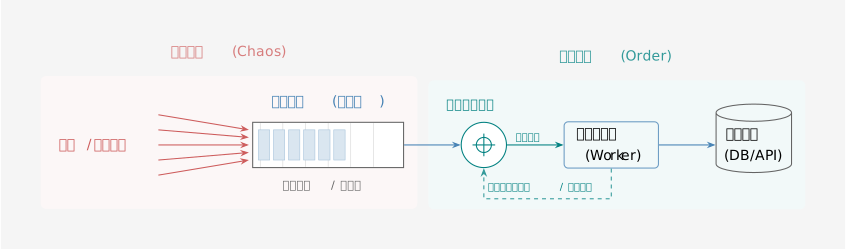
为了应对重试风暴并实现系统的平稳运行,我们需要将 消息队列 与 限流器 进行有机结合,构建一套具备 削峰、蓄水、控流 能力的完整治理架构。
如果将上游的突发流量比作洪峰,下游服务比作脆弱的灌溉区,那么这套架构就是横亘在中间的「三峡大坝」。
整体架构设计
如图所示,流量治理的核心链路包含三个关键阶段:
- 流量注入:上游业务产生的请求不再直接冲击下游,而是首先被封装为消息,写入 消息队列。这一步实现了物理隔离,将同步阻塞的压力转化为异步堆积的存储压力。
- 流量整形:消息队列中的消息并不直接被消费端拉取,而是先通过 限流器。限流器充当了闸门的角色,严格控制流向下游的 QPS。
- 安全消费:只有当限流器允许通过时,消息才会被投递给下游服务。如果下游出现波动,限流器会自动调整流量,迫使消息在队列中积压,从而保护下游不被击穿。
经典限流算法:令牌桶与漏桶
在上述架构中,限流器的核心职责是决定“当前是否允许通过”。业界最经典的两种算法是 令牌桶(Token Bucket) 和 漏桶(Leaky Bucket)。
算法原理
漏桶算法
想象一个底部有孔的水桶。无论上方注水的速度(上游流量)有多快,水永远只能以恒定的速度从孔中流出(处理请求)。如果桶满了,多余的水就会溢出(拒绝请求或阻塞)。
- 特点:强制限制流出的绝对平滑速率,不允许突发流量。
令牌桶算法
系统以恒定的速率向桶中放入令牌。请求到达时,需要拿走一个令牌才能通过。如果桶中存有积累的令牌,则允许瞬间拿走多个。
- 特点:在限制平均速率的同时,允许一定程度的突发流量(Burst)。
静态配置的局限性
虽然经典的限流算法在理论上非常完美,但在工程实践中,我们往往面临一个棘手的问题:如何确定限流阈值(Limit)?
在大多数系统中,这个阈值是作为静态配置(Static Configuration)存在的。然而,下游服务的处理能力(Capacity)从来不是一个常量。
下面的模拟器展示了当限流阈值设定为固定值时,面对下游性能波动(如 GC 停顿、宿主机资源争抢、数据库抖动)时的尴尬境地:
<template>
  <div class="rate-limiter-backlog">
    <h3>令牌桶模拟器:无界积压模式 (Infinite Backlog)</h3>

    <!-- 上半部分:配置面板 -->
    <div class="top-section">
      <div class="panel controls-panel">
        <div class="panel-header">
          <h4>🛠️ 动态参数控制台</h4>
          <div class="status-badges">
            <span class="badge live" v-if="simState.isRunning">🔴 运行中</span>
            <span class="badge mode">无界队列</span>
          </div>
        </div>

        <div class="control-group">
          <label>请求生成速率 (Input Rate): {{ config.inputRate }} req/s</label>
          <input type="range" v-model.number="config.inputRate" min="100" max="3000" step="50" class="slider-input" />
          <div class="quick-actions">
            <button class="btn-tiny" @click="config.inputRate = 500">闲置</button>
            <button class="btn-tiny" @click="config.inputRate = 1200">略高于阈值</button>
            <button class="btn-tiny danger" @click="config.inputRate = 3000">🔥 严重积压</button>
          </div>
        </div>

        <div class="control-group">
          <label>令牌生成速率 (Limit): {{ config.tokenRate }} req/s</label>
          <input type="range" v-model.number="config.tokenRate" min="100" max="3000" step="50" class="slider-limit" />
        </div>

        <div class="control-group">
          <label>令牌桶容量 (Burst): {{ config.bucketSize }} tokens</label>
          <input type="range" v-model.number="config.bucketSize" min="0" max="1000" step="10" />
        </div>

        <div class="control-group">
          <label>⚠️ 积压报警阈值 (仅用于参考): {{ config.queueWarningThreshold }} reqs</label>
          <input type="range" v-model.number="config.queueWarningThreshold" min="100" max="5000" step="100"
            class="slider-warn" />
          <div class="sub-label">模拟系统内存上限,实际积压允许超过此值</div>
        </div>
      </div>

      <div class="panel theory-panel" :class="systemStatusClass">
        <h4>📊 系统状态分析</h4>
        <div class="metrics-grid">
          <div class="metric">
            <span class="label">当前供需比:</span>
            <span class="value">{{ (config.inputRate / config.tokenRate * 100).toFixed(0) }}%</span>
          </div>
          <div class="metric big-metric">
            <span class="label">积压增长趋势:</span>
            <span class="value">{{ growthTrendText }}</span>
          </div>
          <div class="metric">
            <!-- 积压模式下最重要的指标是延迟 -->
            <span class="label">预计排队延迟:</span>
            <span class="value">{{ estimatedLatency }}</span>
          </div>
          <div class="metric">
            <span class="label">系统判定:</span>
            <span class="value">{{ systemStatusText }}</span>
          </div>
        </div>
        <div class="theory-note">
          <small>* 注意:当前模式下不会丢包,但积压会导致处理延迟直线上升,最终导致 OOM。</small>
        </div>
      </div>
    </div>

    <!-- 下半部分:实时模拟 -->
    <div class="simulation-section">
      <div class="sim-header">
        <h4>⚡ 实时动态演练</h4>
        <div class="sim-controls">
          <button v-if="!simState.hasStarted" @click="startSimulation" class="btn-start">▶ 开始实验</button>
          <div v-else class="action-buttons">
            <button @click="clearQueue" class="btn-action" :disabled="simState.currentQueue === 0">🧹 清空队列</button>
            <button @click="resetSimulation" class="btn-reset">⏹ 停止并重置</button>
          </div>
        </div>
      </div>

      <div class="sim-dashboard" v-if="simState.hasStarted">
        <!-- 实时指标卡 -->
        <div class="sim-metrics">
          <div class="sim-metric-card">
            <div class="label">实时通过 (Passed)</div>
            <div class="value success">
              {{ Math.round(simState.currentPassed).toLocaleString() }}
            </div>
            <div class="sub">QPS</div>
          </div>

          <!-- 核心变化:不再显示丢包,而是显示总积压量 -->
          <div class="sim-metric-card">
            <div class="label">当前队列积压 (Backlog)</div>
            <div class="value" :class="backlogClass">
              {{ Math.round(simState.currentQueue).toLocaleString() }}
            </div>
            <div class="sub">Pending Requests</div>
          </div>

          <div class="sim-metric-card">
            <div class="label">预计等待耗时</div>
            <div class="value warning">
              {{ (simState.currentQueue / config.tokenRate).toFixed(2) }} s
            </div>
            <div class="sub">Queue / TokenRate</div>
          </div>
        </div>

        <!-- 动态图表 -->
        <div class="charts-container">

          <!-- 图表 1: 流量处理情况 -->
          <div class="chart-box">
            <div class="chart-title">
              <span>流量监控 (Input vs Passed)</span>
              <span class="legend">
                <span class="dot blue"></span> 输入
                <span class="dot green"></span> 通过
                <span class="line-dash"></span> 限流线
              </span>
            </div>
            <svg width="100%" height="220" viewBox="0 0 850 220" preserveAspectRatio="none">
              <!-- Y轴网格 -->
              <g class="grid-lines">
                <g v-for="(tick, index) in qpsAxisTicks" :key="index">
                  <line :x1="50" :y1="tick.y" :x2="850" :y2="tick.y" stroke="#eee" stroke-width="1" />
                  <text x="45" :y="tick.y + 4" text-anchor="end" font-size="11" fill="#999">{{ tick.label }}</text>
                </g>
              </g>

              <!-- 动态限流线 -->
              <line :x1="50" :y1="getQpsY(config.tokenRate)" :x2="850" :y2="getQpsY(config.tokenRate)" stroke="#666"
                stroke-width="2" stroke-dasharray="5,5" />

              <!-- 输入曲线 -->
              <polyline :points="getPoints(history.input, chartMaxYQPS, 200, 50, 850)" fill="none" stroke="#1890ff"
                stroke-width="2" opacity="0.6" />

              <!-- 通过曲线 -->
              <defs>
                <linearGradient id="greenFillDynamic" x1="0" x2="0" y1="0" y2="1">
                  <stop offset="0%" stop-color="#52c41a" stop-opacity="0.3" />
                  <stop offset="100%" stop-color="#52c41a" stop-opacity="0" />
                </linearGradient>
              </defs>
              <polyline :points="getPoints(history.passed, chartMaxYQPS, 200, 50, 850)" fill="url(#greenFillDynamic)"
                stroke="#52c41a" stroke-width="2" />
            </svg>
          </div>

          <!-- 图表 2: 无界积压监控 -->
          <div class="chart-box small-chart">
            <div class="chart-title">
              <span>积压趋势 (Infinite Queue Growth)</span>
              <span class="legend">
                <span class="dot purple"></span> 实际积压量
                <span class="line-dash red"></span> 报警阈值
              </span>
            </div>
            <svg width="100%" height="150" viewBox="0 0 850 150" preserveAspectRatio="none">
              <!-- 背景线 -->
              <line x1="50" y1="140" x2="850" y2="140" stroke="#ddd" stroke-width="1" />
              <line x1="50" y1="10" x2="850" y2="10" stroke="#f0f0f0" stroke-width="1" />

              <!-- 报警阈值线 (Visual Only) -->
              <line :x1="50" :y1="getQueueY(config.queueWarningThreshold)" :x2="850"
                :y2="getQueueY(config.queueWarningThreshold)" stroke="#ff4d4f" stroke-width="2" stroke-dasharray="4,4"
                opacity="0.7" />
              <text x="845" :y="getQueueY(config.queueWarningThreshold) - 5" text-anchor="end" fill="#ff4d4f"
                font-size="11">报警阈值 ({{ config.queueWarningThreshold }})</text>

              <!-- 队列曲线 (Y轴自动随积压量扩大) -->
              <defs>
                <linearGradient id="purpleFill" x1="0" x2="0" y1="0" y2="1">
                  <stop offset="0%" stop-color="#722ed1" stop-opacity="0.4" />
                  <stop offset="100%" stop-color="#722ed1" stop-opacity="0" />
                </linearGradient>
              </defs>
              <polyline :points="getPoints(history.queue, chartMaxYQueue, 130, 50, 850, 10)" fill="url(#purpleFill)"
                stroke="#722ed1" stroke-width="2" />
            </svg>
          </div>
        </div>
      </div>

      <div class="empty-state" v-else>
        <p>点击“开始实验”,然后将 Input Rate 调高到 Limit 之上,观察积压如何无限增长。</p>
      </div>
    </div>
  </div>
</template>

<script>
export default {
  name: 'RateLimiterBacklog',
  data() {
    return {
      config: {
        inputRate: 800,
        tokenRate: 1000,
        bucketSize: 200,
        queueWarningThreshold: 2000 // 仅作为红线参考,不作为物理限制
      },
      simState: {
        hasStarted: false,
        isRunning: false,
        timer: null,
        tick: 0,
        currentInput: 0,
        currentPassed: 0,
        currentTokens: 200,
        currentQueue: 0 // 这个值现在可以无限增长
      },
      history: {
        input: [],
        passed: [],
        queue: [],
        maxLength: 150
      }
    }
  },
  computed: {
    // 理论分析计算
    growthTrendText() {
      const diff = this.config.inputRate - this.config.tokenRate;
      if (diff <= 0) return '📉 队列正在排空';
      return `📈 每秒积压 +${diff} reqs`;
    },

    estimatedLatency() {
      // 估算:如果现在的队列要处理完,需要多少秒
      if (this.config.tokenRate <= 0) return '∞ s';
      // 理论上如果是长期积压,延迟 = 当前积压 / 处理速度
      // 这里只是对配置的静态估算,实际上应该看 simState.currentQueue
      const diff = this.config.inputRate - this.config.tokenRate;
      if (diff <= 0) return '0 s (实时)';
      return '持续增加中 (∞)';
    },

    systemStatusText() {
      const ratio = this.config.inputRate / this.config.tokenRate;
      if (ratio <= 1.0) return '✅ 系统健康';
      if (ratio <= 1.2) return '⚠️ 缓慢积压';
      return '🔥 严重积压 (延迟爆炸)';
    },

    systemStatusClass() {
      const ratio = this.config.inputRate / this.config.tokenRate;
      if (ratio <= 1.0) return 'status-ok';
      if (ratio <= 1.2) return 'status-warning';
      return 'status-critical';
    },

    backlogClass() {
      if (this.simState.currentQueue > this.config.queueWarningThreshold) return 'danger';
      if (this.simState.currentQueue > 0) return 'warning';
      return 'success';
    },

    // 图表动态 Y 轴 (QPS图)
    chartMaxYQPS() {
      const maxVal = Math.max(
        ...this.history.input,
        this.config.inputRate * 1.2,
        this.config.tokenRate * 1.2,
        100
      );
      return maxVal;
    },

    // 图表动态 Y 轴 (积压图 - 关键!需要随积压量变大)
    chartMaxYQueue() {
      // 至少要能显示报警线,如果积压超过报警线,则以最大积压量为准
      const maxVal = Math.max(
        ...this.history.queue,
        this.config.queueWarningThreshold * 1.2,
        500
      );
      return maxVal;
    },

    qpsAxisTicks() {
      const max = this.chartMaxYQPS;
      const steps = 4;
      const ticks = [];
      for (let i = 0; i <= steps; i++) {
        const val = (max / steps) * i;
        const y = 210 - (val / max) * 200;
        let label = Math.round(val).toString();
        if (val >= 1000) label = (val / 1000).toFixed(1) + 'k';
        ticks.push({ label, y });
      }
      return ticks;
    }
  },
  methods: {
    startSimulation() {
      this.simState.hasStarted = true;
      this.simState.isRunning = true;
      this.simState.tick = 0;
      this.simState.currentTokens = this.config.bucketSize;
      this.simState.currentQueue = 0;

      // 清空历史
      const len = this.history.maxLength;
      this.history.input = new Array(len).fill(0);
      this.history.passed = new Array(len).fill(0);
      this.history.queue = new Array(len).fill(0);

      if (this.simState.timer) clearInterval(this.simState.timer);
      this.simState.timer = setInterval(this.processTick, 100);
    },

    resetSimulation() {
      clearInterval(this.simState.timer);
      this.simState.hasStarted = false;
      this.simState.isRunning = false;
    },

    clearQueue() {
      // 手动运维干预:清空队列
      this.simState.currentQueue = 0;
    },

    processTick() {
      const dt = 0.1; // 100ms

      // 1. 补充令牌
      const newTokens = this.simState.currentTokens + (this.config.tokenRate * dt);
      this.simState.currentTokens = Math.min(this.config.bucketSize, newTokens);

      // 2. 生成输入 (带波动)
      const noise = (Math.random() - 0.5) * (this.config.inputRate * 0.1);
      const inputLoad = Math.max(0, this.config.inputRate + noise);
      this.simState.currentInput = inputLoad;

      const incomingReqs = inputLoad * dt;

      // 3. 核心逻辑:积压模式
      // 待处理总量 = 之前积压的 + 新来的
      let totalPending = this.simState.currentQueue + incomingReqs;
      let passedReqs = 0;

      if (this.simState.currentTokens >= totalPending) {
        // 令牌充足,清空队列
        passedReqs = totalPending;
        this.simState.currentTokens -= totalPending;
        this.simState.currentQueue = 0;
      } else {
        // 令牌不足,有多少处理多少
        // 注意:在积压模式下,通常是贪婪消费令牌
        passedReqs = Math.floor(this.simState.currentTokens);
        this.simState.currentTokens -= passedReqs; // 令牌耗尽

        // 剩下的全部留在队列里 (积压)
        // 不做 maxQueueSize 检查,模拟无界队列
        this.simState.currentQueue = totalPending - passedReqs;
      }

      // 4. 更新状态
      this.simState.currentPassed = passedReqs / dt;
      // 在这个模式下,currentDropped 永远是 0,因为我们选择积压而不是丢弃

      this.updateHistory();
    },

    updateHistory() {
      const h = this.history;
      h.input.push(this.simState.currentInput);
      h.passed.push(this.simState.currentPassed);
      h.queue.push(this.simState.currentQueue);

      if (h.input.length > h.maxLength) {
        h.input.shift();
        h.passed.shift();
        h.queue.shift();
      }
    },

    getQpsY(val) {
      return 210 - (val / this.chartMaxYQPS) * 200;
    },

    // 专门给积压图用的 Y 轴计算 (高度130 + 顶部保留10 = 140 base)
    getQueueY(val) {
      // 130是图表绘图区高度, 140是底部Y坐标
      return 140 - (val / this.chartMaxYQueue) * 130;
    },

    getPoints(dataArray, maxY, height, startX, endX, topPadding = 10) {
      const safeMax = maxY <= 1 ? 100 : maxY;
      const len = dataArray.length;
      const width = endX - startX;
      const bottomY = topPadding + height;

      return dataArray.map((val, index) => {
        const x = startX + (index / (len - 1)) * width;
        const safeVal = Math.max(0, val);
        const y = bottomY - (safeVal / safeMax) * height;
        return `${x},${y}`;
      }).join(' ');
    }
  },
  beforeUnmount() {
    clearInterval(this.simState.timer);
  }
}
</script>

<style scoped>
.rate-limiter-backlog {
  font-family: -apple-system, BlinkMacSystemFont, "Segoe UI", Roboto, sans-serif;
  max-width: 1000px;
  margin: 0 auto;
  color: #333;
  background: #f4f7f9;
  padding: 20px;
  border-radius: 8px;
}

h3,
h4 {
  margin-top: 0;
  color: #2c3e50;
}

.top-section {
  display: grid;
  grid-template-columns: 1fr 1fr;
  gap: 20px;
  margin-bottom: 20px;
}

.panel {
  background: #fff;
  padding: 20px;
  border-radius: 8px;
  box-shadow: 0 2px 8px rgba(0, 0, 0, 0.05);
}

.panel-header {
  display: flex;
  justify-content: space-between;
  align-items: center;
  margin-bottom: 15px;
}

.status-badges {
  display: flex;
  gap: 8px;
}

.badge {
  font-size: 0.75em;
  padding: 3px 8px;
  border-radius: 4px;
  font-weight: bold;
}

.badge.live {
  background: #f5222d;
  color: white;
  animation: pulse 1.5s infinite;
}

.badge.mode {
  background: #722ed1;
  color: white;
}

@keyframes pulse {
  0% {
    opacity: 1;
  }

  50% {
    opacity: 0.5;
  }

  100% {
    opacity: 1;
  }
}

.control-group {
  margin-bottom: 15px;
  border-bottom: 1px solid #f0f0f0;
  padding-bottom: 15px;
}

.control-group:last-child {
  border-bottom: none;
  padding-bottom: 0;
}

.control-group label {
  display: flex;
  justify-content: space-between;
  font-size: 0.9em;
  font-weight: 600;
  margin-bottom: 8px;
}

.sub-label {
  font-size: 0.75em;
  color: #999;
  margin-top: 4px;
}

input[type=range] {
  width: 100%;
  cursor: pointer;
  display: block;
}

.slider-input {
  accent-color: #1890ff;
}

.slider-limit {
  accent-color: #52c41a;
}

.slider-warn {
  accent-color: #ff4d4f;
}

.quick-actions {
  display: flex;
  gap: 8px;
  margin-top: 8px;
}

.btn-tiny {
  padding: 2px 8px;
  font-size: 0.8em;
  border: 1px solid #ddd;
  background: #fff;
  border-radius: 4px;
  cursor: pointer;
}

.btn-tiny:hover {
  background: #f0f0f0;
}

.btn-tiny.danger {
  color: #f5222d;
  border-color: #ffa39e;
}

.btn-tiny.danger:hover {
  background: #fff1f0;
}

.metrics-grid {
  display: grid;
  grid-template-columns: 1fr 1fr;
  gap: 15px;
}

.metric {
  display: flex;
  flex-direction: column;
}

.metric.big-metric {
  grid-column: span 2;
  background: #f9f9f9;
  padding: 10px;
  border-radius: 4px;
  align-items: center;
}

.metric .label {
  font-size: 0.85em;
  color: #888;
}

.metric .value {
  font-size: 1.2em;
  font-weight: bold;
  color: #333;
}

.theory-note {
  margin-top: 15px;
  color: #999;
  font-size: 0.8em;
}

.status-ok {
  border-left: 5px solid #52c41a;
}

.status-warning {
  border-left: 5px solid #faad14;
}

.status-critical {
  border-left: 5px solid #ff4d4f;
}

.simulation-section {
  background: #fff;
  padding: 20px;
  border-radius: 8px;
  box-shadow: 0 4px 12px rgba(0, 0, 0, 0.08);
  min-height: 400px;
}

.sim-header {
  display: flex;
  justify-content: space-between;
  align-items: center;
  margin-bottom: 20px;
  border-bottom: 1px solid #eee;
  padding-bottom: 10px;
}

.btn-start {
  background: #1890ff;
  color: white;
  padding: 8px 20px;
  border: none;
  border-radius: 4px;
  cursor: pointer;
  font-weight: bold;
}

.btn-start:hover {
  background: #40a9ff;
}

.action-buttons {
  display: flex;
  gap: 10px;
}

.btn-action {
  background: #faad14;
  color: white;
  padding: 8px 15px;
  border: none;
  border-radius: 4px;
  cursor: pointer;
  font-weight: bold;
}

.btn-action:disabled {
  background: #ddd;
  cursor: not-allowed;
}

.btn-reset {
  background: #f5222d;
  color: white;
  padding: 8px 15px;
  border: none;
  border-radius: 4px;
  cursor: pointer;
  font-weight: bold;
}

.sim-metrics {
  display: grid;
  grid-template-columns: repeat(3, 1fr);
  gap: 20px;
  margin-bottom: 20px;
}

.sim-metric-card {
  background: #f5f7fa;
  padding: 15px;
  border-radius: 6px;
  text-align: center;
}

.sim-metric-card .label {
  font-size: 0.9em;
  color: #666;
}

.sim-metric-card .value {
  font-size: 1.8em;
  font-weight: 800;
  color: #333;
  margin: 5px 0;
}

.sim-metric-card .value.success {
  color: #52c41a;
}

.sim-metric-card .value.danger {
  color: #f5222d;
}

.sim-metric-card .value.warning {
  color: #faad14;
}

.sim-metric-card .sub {
  font-size: 0.8em;
  color: #999;
}

.charts-container {
  display: flex;
  flex-direction: column;
  gap: 20px;
}

.chart-box {
  border: 1px solid #eee;
  padding: 10px;
  border-radius: 4px;
  background: #fff;
}

.chart-title {
  display: flex;
  justify-content: space-between;
  font-size: 0.9em;
  color: #666;
  margin-bottom: 10px;
  padding-left: 10px;
}

.legend {
  display: flex;
  gap: 10px;
  align-items: center;
}

.dot {
  width: 8px;
  height: 8px;
  border-radius: 50%;
  display: inline-block;
}

.dot.blue {
  background: #1890ff;
}

.dot.green {
  background: #52c41a;
}

.dot.purple {
  background: #722ed1;
}

.line-dash {
  width: 15px;
  height: 2px;
  background: #666;
  display: inline-block;
  border-bottom: 1px dashed #666;
}

.line-dash.red {
  border-bottom-color: #ff4d4f;
}

.empty-state {
  text-align: center;
  padding: 50px;
  color: #999;
  background: #fafafa;
  border-radius: 4px;
}

@media (max-width: 768px) {

  .top-section,
  .sim-metrics {
    grid-template-columns: 1fr;
  }
}
</style>

<style scoped>
/* 通用模拟器样式 */
.simulator-common {
  /* 由各个组件继承的基础样式 */
}

/* 模拟器容器基础样式 */
.simulator-base {
  padding: 20px;
  border: 1px solid #e0e0e0;
  border-radius: 8px;
  background: #f9f9f9;
  margin: 20px 0;
}

/* 模拟器容器布局 */
.simulator-container {
  display: grid;
  grid-template-columns: 1fr 1fr;
  gap: 30px;
  align-items: start;
}

.simulator-container.narrow {
  grid-template-columns: 300px 1fr;
}

.simulator-container.wide {
  grid-template-columns: 1fr;
}

/* 控制区域样式 */
.controls {
  display: flex;
  flex-direction: column;
  gap: 20px;
}

.control-section {
  background: white;
  padding: 20px;
  border-radius: 8px;
  box-shadow: 0 2px 4px rgba(0,0,0,0.1);
}

.control-section h4 {
  margin: 0 0 15px 0;
  color: #333;
  font-size: 14px;
  font-weight: 600;
}

/* 控制组样式 */
.control-group {
  display: flex;
  flex-direction: column;
  gap: 8px;
  margin-bottom: 15px;
}

.control-group:last-child {
  margin-bottom: 0;
}

.control-group label {
  font-weight: 600;
  color: #333;
  font-size: 14px;
}

.control-group input[type="range"] {
  width: 100%;
  height: 6px;
  border-radius: 3px;
  background: #ddd;
  outline: none;
  -webkit-appearance: none;
}

.control-group input[type="range"]::-webkit-slider-thumb {
  -webkit-appearance: none;
  appearance: none;
  width: 18px;
  height: 18px;
  border-radius: 50%;
  background: #4CAF50;
  cursor: pointer;
  box-shadow: 0 2px 4px rgba(0,0,0,0.2);
}

.control-group input[type="range"]::-moz-range-thumb {
  width: 18px;
  height: 18px;
  border-radius: 50%;
  background: #4CAF50;
  cursor: pointer;
  border: none;
  box-shadow: 0 2px 4px rgba(0,0,0,0.2);
}

.control-group input[type="range"]::-webkit-slider-thumb.blue {
  background: #2196F3;
}

.control-group input[type="range"]::-moz-range-thumb.blue {
  background: #2196F3;
}

.value-display {
  font-size: 12px;
  color: #666;
  font-weight: 500;
}

/* 算法选择器样式 */
.algorithm-selector {
  grid-column: 1 / -1;
  margin-bottom: 20px;
}

.algorithm-selector h4 {
  margin: 0 0 15px 0;
  color: #333;
}

.algorithm-tabs {
  display: flex;
  gap: 10px;
}

.algorithm-tabs button {
  padding: 10px 20px;
  border: 2px solid #ddd;
  background: white;
  border-radius: 6px;
  cursor: pointer;
  transition: all 0.3s ease;
  font-size: 13px;
  font-weight: 500;
}

.algorithm-tabs button:hover {
  background: #f5f5f5;
}

.algorithm-tabs button.active {
  background: #2196F3;
  color: white;
  border-color: #2196F3;
}

/* 场景按钮组样式 */
.scenario-buttons {
  display: grid;
  grid-template-columns: repeat(auto-fit, minmax(100px, 1fr));
  gap: 8px;
  margin-top: 10px;
}

.scenario-buttons button {
  padding: 8px 12px;
  border: 1px solid #ddd;
  background: white;
  border-radius: 4px;
  cursor: pointer;
  font-size: 12px;
  transition: all 0.3s ease;
}

.scenario-buttons button:hover {
  background: #f5f5f5;
  border-color: #2196F3;
}

/* 结果展示区域样式 */
.results {
  display: flex;
  flex-direction: column;
  gap: 25px;
}

.metrics-grid {
  display: grid;
  grid-template-columns: repeat(auto-fit, minmax(250px, 1fr));
  gap: 20px;
}

.metric-card {
  background: white;
  padding: 20px;
  border-radius: 8px;
  box-shadow: 0 2px 8px rgba(0,0,0,0.1);
  border-left: 4px solid #4CAF50;
}

.metric-card.critical {
  border-left-color: #f44336;
}

.metric-card h4 {
  margin: 0 0 15px 0;
  color: #333;
  font-size: 16px;
  font-weight: 600;
}

.metric {
  display: flex;
  justify-content: space-between;
  align-items: center;
  margin-bottom: 10px;
  padding: 8px 0;
  border-bottom: 1px solid #f0f0f0;
}

.metric:last-child {
  border-bottom: none;
  margin-bottom: 0;
}

.metric .label {
  font-weight: 500;
  color: #666;
  font-size: 12px;
}

.metric .value {
  font-weight: 700;
  color: #333;
  font-size: 12px;
}

.metric.warning .value {
  color: #f44336;
}

.metric.success .value {
  color: #4CAF50;
}

.metric .value.good {
  color: #4CAF50;
}

.metric .value.fair {
  color: #ff9800;
}

.metric .value.poor {
  color: #f44336;
}

/* 图表区域样式 */
.chart-section {
  background: white;
  padding: 20px;
  border-radius: 8px;
  box-shadow: 0 2px 8px rgba(0,0,0,0.1);
}

.chart-section h4 {
  margin: 0 0 15px 0;
  color: #333;
  font-size: 16px;
  font-weight: 600;
}

.dual-chart {
  display: grid;
  grid-template-columns: 1fr 1fr;
  gap: 20px;
}

.chart-container {
  border: 1px solid #e0e0e0;
  border-radius: 4px;
  overflow: hidden;
}

.chart-container h5 {
  margin: 0;
  padding: 10px;
  background: #f5f5f5;
  color: #333;
  font-size: 12px;
  font-weight: 600;
}

.load-chart {
  width: 100%;
}

.chart-container {
  width: 100%;
  margin-bottom: 15px;
  border: 1px solid #e0e0e0;
  border-radius: 4px;
  overflow: hidden;
}

.chart-legend {
  display: flex;
  gap: 20px;
  flex-wrap: wrap;
}

.legend-item {
  display: flex;
  align-items: center;
  gap: 8px;
  font-size: 12px;
  color: #666;
}

.legend-color {
  width: 16px;
  height: 3px;
  border-radius: 2px;
}

/* 特殊可视化组件 */
.bucket-visualization {
  width: 100%;
  height: 40px;
  background: #f5f5f5;
  border-radius: 4px;
  overflow: hidden;
  margin-top: 10px;
}

.bucket-bar {
  width: 100%;
  background: linear-gradient(to top, #4CAF50, #81C784);
  transition: height 0.3s ease;
  border-radius: 4px;
}

.timeline {
  position: relative;
  height: 60px;
  background: #f5f5f5;
  border-radius: 4px;
  margin-bottom: 10px;
  overflow: hidden;
}

.retry-event {
  position: absolute;
  top: 50%;
  transform: translate(-50%, -50%);
  width: 24px;
  height: 24px;
  border-radius: 50%;
  color: white;
  font-size: 10px;
  font-weight: bold;
  display: flex;
  align-items: center;
  justify-content: center;
  cursor: pointer;
  transition: all 0.3s ease;
}

.retry-event:hover {
  transform: translate(-50%, -50%) scale(1.2);
  box-shadow: 0 4px 8px rgba(0,0,0,0.3);
}

.timeline-labels {
  display: flex;
  justify-content: space-between;
  font-size: 12px;
  color: #666;
}

/* 配置警告样式 */
.config-warning {
  margin-top: 5px;
  padding: 8px;
  background: #fff3cd;
  border: 1px solid #ffeaa7;
  border-radius: 4px;
  color: #856404;
  font-size: 12px;
}

/* 分析区域样式 */
.analysis-section {
  background: white;
  padding: 20px;
  border-radius: 8px;
  box-shadow: 0 2px 8px rgba(0,0,0,0.1);
}

.analysis-section h4 {
  margin: 0 0 15px 0;
  color: #333;
  font-size: 16px;
  font-weight: 600;
}

.problems-list {
  display: flex;
  flex-direction: column;
  gap: 15px;
}

.problem-item {
  display: flex;
  gap: 12px;
  padding: 15px;
  background: #fff5f5;
  border: 1px solid #fed7d7;
  border-radius: 6px;
}

.problem-item .icon {
  font-size: 16px;
  flex-shrink: 0;
  margin-top: 2px;
}

.problem-content strong {
  color: #742a2a;
  font-size: 13px;
}

.problem-content p {
  margin: 5px 0 0 0;
  color: #9b2c2c;
  font-size: 12px;
  line-height: 1.4;
}

/* 对比分析样式 */
.algorithm-comparison {
  background: white;
  padding: 20px;
  border-radius: 8px;
  box-shadow: 0 2px 8px rgba(0,0,0,0.1);
}

.algorithm-comparison h4 {
  margin: 0 0 15px 0;
  color: #333;
  font-size: 16px;
  font-weight: 600;
}

.comparison-grid {
  display: grid;
  grid-template-columns: 1fr 1fr;
  gap: 20px;
  margin-bottom: 20px;
}

.comparison-item {
  border: 2px solid #e0e0e0;
  border-radius: 8px;
  padding: 15px;
}

.comparison-item.highlighted {
  border-color: #4CAF50;
  background: #f1f8e9;
}

.comparison-item h5 {
  margin: 0 0 10px 0;
  color: #333;
  font-size: 13px;
  font-weight: 600;
}

.comparison-metrics {
  display: flex;
  flex-direction: column;
  gap: 8px;
}

.comparison-metric {
  display: flex;
  justify-content: space-between;
  font-size: 12px;
}

.comparison-metric span:first-child {
  color: #666;
}

.comparison-metric span:last-child {
  font-weight: 600;
  color: #333;
}

.improvement-summary {
  display: flex;
  flex-direction: column;
  gap: 10px;
  padding: 15px;
  background: #e8f5e8;
  border-radius: 6px;
}

.improvement-item {
  display: flex;
  justify-content: space-between;
  align-items: center;
}

.improvement-label {
  font-size: 12px;
  color: #2e7d32;
}

.improvement-value {
  font-size: 12px;
  font-weight: 600;
}

.improvement-value.positive {
  color: #2e7d32;
}

/* 响应式设计 */
@media (max-width: 768px) {
  .simulator-container {
    grid-template-columns: 1fr;
    gap: 20px;
  }

  .simulator-container.narrow {
    grid-template-columns: 1fr;
  }

  .metrics-grid {
    grid-template-columns: 1fr;
  }

  .dual-chart {
    grid-template-columns: 1fr;
  }

  .comparison-grid {
    grid-template-columns: 1fr;
  }

  .chart-legend {
    gap: 10px;
  }

  .scenario-buttons {
    grid-template-columns: 1fr 1fr;
  }
}

@media (max-width: 480px) {
  .scenario-buttons {
    grid-template-columns: 1fr;
  }

  .algorithm-tabs {
    flex-direction: column;
  }
}

</style>
从演示中我们可以发现静态限流的致命缺陷:
- 阈值过低:当由于硬件升级或缓存预热导致下游性能提升时,限流器依然按照旧标准工作,导致大量计算资源闲置浪费。
- 阈值过高:当由于网络抖动或慢 SQL 导致下游性能下降时,固定的阈值变成了“由于过载导致的攻击”,瞬间压垮下游。
此外,由于下游服务承载能力动态变化的不可预知性以及服务结构日益陡增的复杂性,人工根据对系统已知信息调整阈值的做法总是滞后的,甚至是不可能的。
因此,我们需要一种机制,让限流器像 TCP 协议 一样,无需任何系统全局的先验信息,能够感知链路拥塞并自动调整速率。
下一代方案:基于延迟的自适应限流
为了解决静态配置的缺陷,我们引入 自适应限流(Adaptive Rate Limiting)。其核心思想源于 TCP 的拥塞控制算法(如 TCP Vegas 或 BBR)以及排队论中的 利特尔法则(Little's Law)。
核心思想
服务的健康状态最好的衡量指标不是 CPU 使用率,而是 响应时间(Latency/RTT)。
- 当系统负载未满时,增加并发量,响应时间基本保持稳定。
- 当系统接近过载时,请求开始在内部排队,响应时间出现抖动并显著上升。
因此,我们可以通过监测 RTT (Round Trip Time) 的变化率来反推系统的吞吐瓶颈。
算法实现:基于 EWMA 与 TCP Vegas 的变体
我们需要构建一个闭环控制系统,包含 测量(Measurement) 和 控制(Control) 两个环节。
1. 测量:指数加权移动平均(EWMA)
由于网络抖动和 GC 的存在,单次请求的 RTT 具有极大的噪声。直接使用瞬时值会导致限流器剧烈震荡。我们采用 指数加权移动平均(EWMA, Exponential Weighted Moving Average) 来估测平滑后的延迟。
其中 是衰减因子(例如 0.9),这意味着我们既保留了历史趋势,又赋予了当前样本一定的权重。同时,我们还需要计算 RTT 的标准差 来评估抖动情况。
2. 控制:基于梯度的动态调整
参考 TCP Vegas 的思想,我们维护两个核心变量:
min_rtt: 过去一段时间内的最小延迟(代表系统在空闲时的物理处理能力)。curr_rtt: 当前经过 EWMA 平滑后的延迟。
我们定义 排队延迟(Queuing Delay) 为:
限流器的调整逻辑如下:
- 拥塞探测(No Load):如果 ,说明系统运行极其通畅,队列为空。此时我们缓慢增加限流阈值(Linear Increase),探索性能上限。
- 拥塞避免(Congestion Detected):如果 ,说明请求开始在下游排队,处理能力饱和。此时我们需要按比例降低限流阈值。
这个公式的物理含义非常直观:如果当前延迟变成了最小延迟的 2 倍,说明有一半的时间耗费在了排队上,因此我们将吞吐量减半,以消除排队现象。
方案优势
通过这种基于延迟的自适应算法,我们实现了:
- 零人工介入:无论下游服务是扩容还是宕机,限流器都能在毫秒级自动适应。
- 资源利用最大化:系统始终运行在
min_rtt附近的最佳负载点,既不浪费资源,也不引发雪崩。 - 快速收敛:相比于基于 CPU 阈值的被动限流(通常有 10秒+ 的监控延迟),基于 RTT 的限流是实时的。
(未完待续)
分布式系统:概念与设计 (原书第 5 版)。 ↩︎